


GPS Tracker - Family Locator
3.812.00 Reviews
App Specs
- Version
- 1.0.5
- Updated On
- License
- Free
- Downloads
- 1,000,000+
- Developer
- Esame Marketing Limited
- Categories
- Maps & Navigation
- Platform
- Android
Screenshots

 Analysis by AppCompare
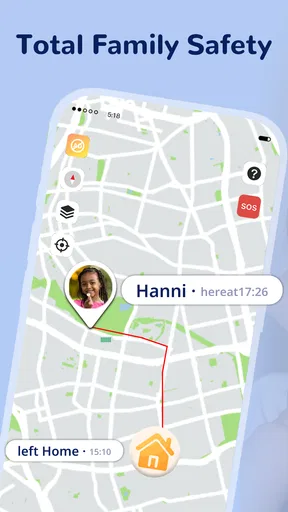
I see GPS Tracker - Family Locator as a practical tool for families who want a shared view of where everyone is, rather than another messaging app or a full navigation replacement. Its appeal is the combination of map-based location sharing, history, and alerts around familiar places. That mix can reduce the “Did you get there?” messages during a busy day, but it also asks everyone in a family to agree on how location sharing should work. I’d recommend it most when that agreement is already there.
What to decide before inviting anyone
A family tracker is only useful when the people being followed understand the arrangement and take part willingly. Before creating a shared group, I’d explain what the map is for, who can see it, and when people are expected to keep sharing their location. That small conversation can prevent the app from feeling like surveillance, especially with teenagers or adults who value privacy.
I’d also start with the smallest useful group. If the goal is to know whether a child has reached school, invite the caregivers who genuinely need that information rather than every relative and friend. Fewer members make the shared map easier to interpret and reduce the chance that location updates become background noise. You can always broaden the group later if everyone is comfortable.
A family day out is a better test than a quiet afternoon
To judge whether a locator suits your routine, try it during a real outing rather than checking the map while everyone is sitting at home. A crowded park, a large shopping area, or a day with separate errands gives the map a meaningful job: helping the group reconnect without repeated calls. Agree on a simple fallback, such as meeting at a known entrance, because a phone can be indoors, out of battery, or temporarily unable to send a fresh position.
That last point matters. A map marker is useful context, not proof that someone is standing at an exact spot at this instant. I treat location as a way to narrow down where to look or decide whether to send a message, not as a substitute for direct communication. This is especially important when a family member is travelling through places where phone reception or GPS reception may be inconsistent.
History is most useful for routine, not constant checking
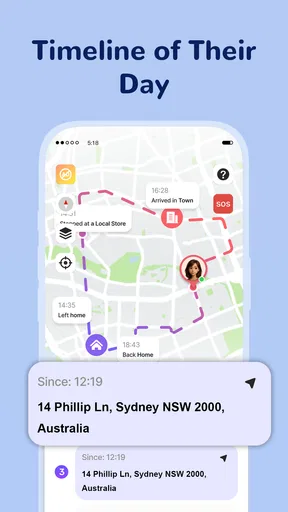
Location history can help answer a practical question later, such as whether someone took the usual route or reached a familiar destination. It works best when there is a clear reason to look back. If you check it repeatedly without a specific need, the feature can turn ordinary movements into a source of worry, even when nothing is wrong.
I’d agree on a light-touch habit with the family: use history to resolve a particular uncertainty, and ask the person directly if the information raises a question. That approach preserves the convenience of a record without treating every stop as something that needs an explanation. It also keeps the app in its proper role—as a coordination aid, not a replacement for trust.
Worth Reading Before You Choose

EA SPORTS FC Mobile 26 Is a Bigger Football Game, but It Takes Time

Flipboard Shows What News Apps Must Do Beyond the Feed

Switching to Android Auto Means Rethinking Your Driving Routine

Google Calendar Makes a Crowded Week Easier to Manage

Ludo King Makes the Most of the Minutes Between Plans

Baby Panda World Brings Quick Play to Modern Phones, but Its Game Library Feels Busy
Alerts should reduce messages, not create a new stream of them
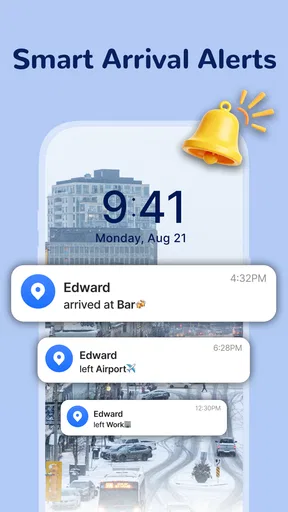
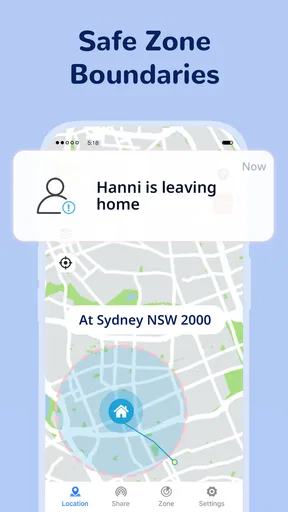
Place notifications are most valuable when they answer a question you would otherwise ask by text. A school arrival alert, for example, can spare a parent from interrupting a child during the journey. But setting up a separate alert for every ordinary destination can make the phone buzz so often that the important notification gets lost among routine ones.
I’d begin with one or two locations that matter to the household and use them for a week before adding more. Think about who actually needs each alert, too. A caregiver waiting for confirmation may benefit from it; other Circle members may not. A restrained setup makes place alerts easier to trust and less likely to become another source of distraction.
How it differs from built-in sharing and navigation apps
Many phones already offer some form of location sharing, while messaging apps can send a temporary position when someone is on the way. Those options are often enough for a small household that only needs occasional check-ins. A dedicated family locator makes more sense when the group wants location, past movement, and arrival or departure notifications gathered around a family routine rather than scattered across separate conversations.
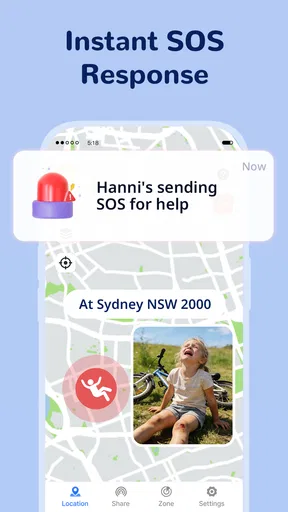
It is not the tool I’d choose for turn-by-turn directions, finding a business, or planning a route. A maps app is better for those jobs. Nor would I use a family tracker as an emergency service: an SOS alert can be a helpful way to signal for attention, but it cannot guarantee that someone will see it or respond. For urgent danger, local emergency services and a direct call remain the priority.
Who is likely to get the most from it
The strongest fit is a household with several people moving on different schedules: parents coordinating school pickups, partners handling errands, or relatives helping an older family member get around. The shared map can remove some uncertainty when plans change, while history and place alerts can handle a few recurring check-ins without requiring a conversation every time.
It is less suitable for someone who wants to track another person without their knowledge, or for a family whose members do not agree on sharing location. It may also be more than you need if you only want to send a one-off location pin. In that case, the sharing feature already built into a phone or chat app can be simpler and less demanding.
Cost, compatibility, and what to check first
The app is free to download, though optional in-app purchases range from $2.99 to $9.99 per item. I would decide what the household actually needs before buying anything, rather than assuming that a paid option is necessary for basic coordination. The app is made by Esame Marketing Limited, is rated for Everyone, and its current version is 1.0.5. It was released on March 9, 2026, and supports devices running Android 7.0 or later.
Before inviting the whole family, check that everyone can install it on their device and is willing to keep location sharing enabled. Also agree on what to do if a marker appears stale: send a message, call, or wait briefly rather than drawing a firm conclusion from the map. These simple expectations make a location tool more useful and prevent a technical hiccup from becoming a family argument.
The app has 500K+ installs, while its average rating is 0.0, so I would not use a rating score as a shortcut for deciding whether it fits. I’d judge it against the household’s actual needs: a shared map and routine arrival checks are worthwhile only if the family will use them and feels comfortable with the arrangement.
If you've ever had that moment of panic when you can't locate a family member, then you'll want to check out GPS Tracker - Family Locator. This app is a game-changer for anyone who wants peace of mind knowing their loved ones are safe and sound. Let me walk you through my experience with this handy app.
Getting Started
Installing GPS Tracker - Family Locator was a breeze. Available on both Android and iOS, I found it easily on the app store. The setup process was straightforward. After downloading, the app prompted me to create an account. It required a phone number or email, and a quick verification later, I was all set to explore the features.
Setting Up Your Circle
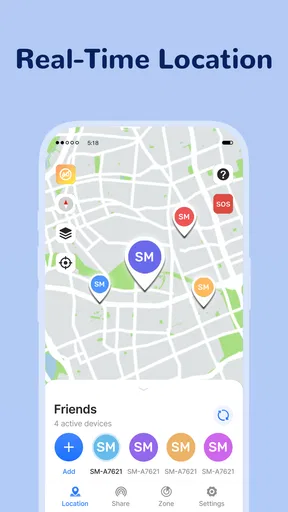
One of the coolest parts of this app is setting up your "Circle". This is basically a group of family members or friends with whom you want to share your location. I added my partner and my kids, and just like that, we were connected. The app lets you send invites via text or email, making it super easy to get everyone on board.
Real-Time Location Sharing
Now, here's where the magic happens. The real-time location sharing feature lets you see where your family members are on a map. I tested this during a family outing, and it was spot-on. The app updates locations frequently, ensuring you’re never left wondering where anyone is.
Location History
You can also view location history, which is a lifesaver if you need to backtrack someone's steps. For instance, my teenager often forgets to text when arriving somewhere, so being able to check location history gives me peace of mind. It’s like having a virtual breadcrumb trail!
Places and Alerts
Another feature I found useful is setting up "Places". These are specific locations like home, school, or work. You can set alerts to notify you when someone arrives or leaves a place. I set up alerts for my kids’ school, and it worked seamlessly. I got notifications right on time, which is perfect for busy parents.
Battery Consumption
Now, I know what you're thinking — GPS apps can be battery hogs. Surprisingly, GPS Tracker - Family Locator does a good job of managing battery use. I kept a close eye on my phone’s battery levels during our outing, and it was minimal. The app cleverly updates location without draining too much power.
Privacy and Security
With any tracking app, privacy is a big concern. Thankfully, this app takes privacy seriously. You can customize who sees your location and when. Plus, the app uses secure encryption, so your data is protected. I felt reassured knowing that only my Circle had access to my location.
User Interface
The user interface is intuitive and clean. Even for someone like me who isn’t tech-savvy, navigating the app was effortless. The map is interactive, and all the features are just a tap away. I especially appreciated the color-coded markers for family members, making it easy to spot who’s where.
Subscription and Pricing
The app is free to download and offers basic features at no cost. However, if you want extras like unlimited place alerts or priority customer support, there's a premium subscription. I opted for the free version and found it quite sufficient for my needs, but the premium offers are tempting for larger families or those with specific needs.
Final Thoughts
Overall, GPS Tracker - Family Locator is a solid choice for anyone wanting to keep tabs on their loved ones without being intrusive. It’s packed with features that are both practical and reassuring. Whether you're a parent, partner, or just someone who wants to stay connected with friends, this app offers everything you need to feel at ease. Give it a try, and you might just find it becoming an essential part of your daily routine.
Pros
- Real-time location updates enhance safety.
- User-friendly interface with easy navigation.
- Customizable alerts for specific locations.
- Cross-platform compatibility for Android and iOS.
- Low battery consumption for prolonged use.
Cons
- Requires constant internet connection.
- Limited features in the free version.
- Privacy concerns with location sharing.
- Occasional inaccuracies in location tracking.
- Ads can be intrusive in the free version.
FAQs for GPS Tracker - Family Locator
How accurate is the GPS Tracker - Family Locator?
The GPS Tracker - Family Locator provides highly accurate location tracking by using a combination of GPS, Wi-Fi, and cellular networks. While GPS is generally precise, factors such as building interference or a weak signal can slightly affect accuracy. Users typically find it reliable for real-time tracking and getting location updates.
Is my privacy protected when using the app?
Yes, the GPS Tracker - Family Locator prioritizes user privacy. All location data is encrypted and shared only with those you authorize. The app includes customizable privacy settings, allowing you to control who can see your location and when. It's designed to ensure your data stays secure and private.
Does the app drain my phone's battery quickly?
The GPS Tracker - Family Locator is optimized to minimize battery usage. It uses energy-efficient algorithms to update locations and provide real-time tracking without significantly impacting battery life. However, like any GPS-based app, continuous use can lead to increased battery consumption, so it’s best to manage usage accordingly.
Can I use the app in areas with poor network coverage?
While the GPS Tracker - Family Locator performs best with strong network coverage, it can still function in areas with limited connectivity. The app stores location data and updates it once a stable connection is re-established. However, real-time tracking might be delayed until the network is restored.
What features are included in the free version of the app?
The free version of the GPS Tracker - Family Locator offers essential features such as real-time location sharing, alerts for arriving or leaving designated areas, and basic notifications. For advanced features like location history, premium support, or geofencing, users might need to upgrade to the premium version.


